
Websites handle large amounts of information every day. Ecommerce platforms manage product details, customer accounts, orders, and payment records. As databases grow, retrieving specific information can become slower.
This problem often affects websites with thousands or millions of records. Without proper optimization, databases may need to examine numerous rows before finding the required information.
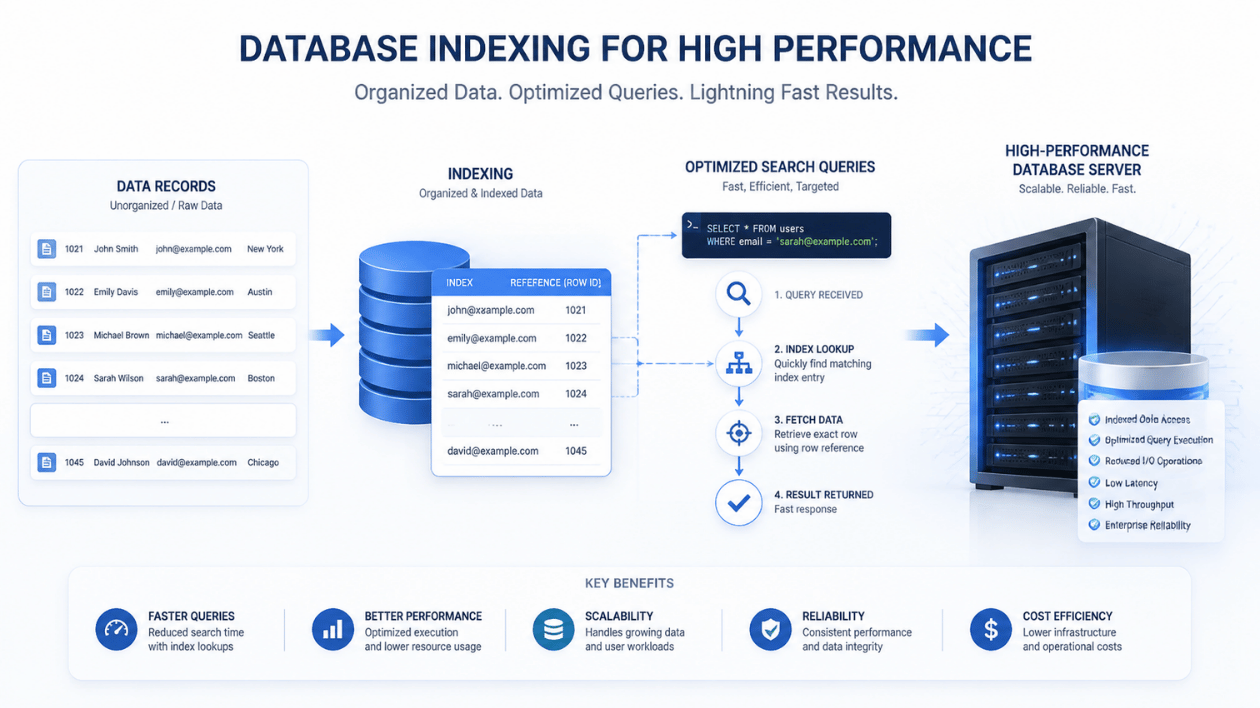
Database Indexing helps solve this problem by creating structured data references. These references allow database systems to locate information without scanning every record. As a result, applications can retrieve information faster and handle user requests more efficiently.
What Is Database Indexing?
Database Indexing is a technique that organizes references to database records. It helps database management systems locate specific information without examining every row in a table.
Think of a book with an index at the back. Instead of reading every page to find a particular topic, you can check the index and jump directly to the relevant page.
Database indexes work similarly. They store selected column values with references to their corresponding records.
For example, an ecommerce website may contain thousands of customer records. When a customer logs in, the application needs to find the account associated with their email address.
Without an appropriate index, the database may scan many records. An index on the email column can help locate the matching account more efficiently.
Why Is Database Indexing Important for Website Performance?
Database performance directly affects how quickly websites respond to user requests. Slow queries can delay product searches, account access, payment processing, and other important activities.
Database Indexing helps businesses improve these operations.
1. Faster Data Retrieval
Databases without suitable indexes may perform full table scans. This means they examine multiple records to find the requested information.
An appropriate index reduces unnecessary searching. The database can use indexed values to identify matching records more quickly.
For example, a travel booking website may store thousands of hotel listings. An index on the location column can help retrieve hotels in a selected city more efficiently.
2. Better Website Loading Speed
Many website pages depend on database queries. Product listings, customer dashboards, booking details, and search results require information from backend systems.
When queries take too long, users may experience delays.
Proper indexing helps reduce query execution time. This can improve page response times, particularly on websites with large databases.
3. Improved Application Scalability
As businesses grow, their websites collect more information. A database that performs well with 5,000 records may struggle with millions of records.
Database Indexing helps applications manage larger datasets more efficiently.
However, indexing alone cannot solve every performance problem. Developers must also review query structure, server resources, and database architecture.
4. Reduced Database Workload
Indexes help databases avoid unnecessary record searches. This can reduce the amount of work required for certain queries.
However, indexes also consume storage and require maintenance. Every insert, update, or delete operation may require corresponding index changes.
Developers should therefore create indexes based on actual application requirements.
How Database Indexing Works
Database Indexing works by creating an additional data structure that helps the database locate records.
Most relational databases use structures such as B-tree indexes for common lookup operations.
Consider a website that stores customer information in a database.
A customer table might contain:
| Customer ID | Name | |
|---|---|---|
| 101 | Rahul | rahul@example.com |
| 102 | Priya | priya@example.com |
| 103 | Amit | amit@example.com |
When a user searches for an email address, the database needs to identify the matching record.
Without an index, it may examine records one by one.
With an index on the email column, the database can use the index structure to locate the corresponding record more efficiently.
The process generally involves:
- Developers identify frequently searched database columns.
- They create an index on the selected column.
- The database organizes indexed values and record references.
- When a matching query arrives, the database checks the index.
- It retrieves the relevant records using the available references.
The database query optimizer decides whether using an index is beneficial for a particular query.
Common Types of Database Indexes
Different indexing methods support different database operations. Developers should understand these options before designing database structures.
1. Primary Index
A primary index is associated with a table’s primary key. It helps identify individual records using their unique identifiers.
For example, an ecommerce platform may use customer IDs to retrieve account information.
Primary keys are commonly indexed automatically by relational database systems.
2. Unique Index
A unique index prevents duplicate values in the indexed column or combination of columns.
For example, a registration system may require every customer to have a unique email address.
A unique index helps enforce this requirement at the database level.
3. Composite Index
A composite index includes multiple columns.
For example, an online store may frequently retrieve orders using both customer ID and order date.
An index covering these columns can support queries that filter using the indexed column combination.
Column order matters when designing composite indexes. Developers should consider how their applications actually query the data.
4. Clustered Index
A clustered index determines how table records are organized according to the database engine’s storage implementation.
Some relational databases allow one clustered index per table.
It can improve access to records when queries frequently retrieve data using the indexed ordering.
5. Non-Clustered Index
A non-clustered index stores an independent structure containing indexed values and references to the corresponding records.
A table can have multiple non-clustered indexes, depending on database limitations.
These indexes help applications search different columns without changing the underlying table organization.
Database Indexing Examples in Real-World Applications
Database indexing supports websites and applications across different industries.
Ecommerce Websites
Online stores manage product information, customer accounts, shopping carts, and order histories.
An index on product IDs or category fields can help retrieve relevant products faster.
Customer email indexes can also support account searches and login operations.
Banking Applications
Banking platforms process account details, transaction records, and payment information.
Indexes on account identifiers and transaction dates can support frequent database queries.
Developers must also consider security, data consistency, and transaction requirements.
Healthcare Platforms
Healthcare applications manage patient records, appointments, billing information, and medical documents.
Database indexes can help retrieve records using patient IDs, appointment dates, or other frequently searched fields.
Travel Booking Websites
Travel platforms handle hotel listings, flight information, customer bookings, and payment records.
Indexes on destination, travel dates, and booking identifiers can improve access to frequently requested information.
How to Create a Database Index
Developers can create indexes using SQL commands in relational database management systems.
Consider a customer table containing customer IDs, names, and email addresses.
To create an index on the email column, developers can use:
CREATE INDEX idx_customer_email
ON customers (email);
This creates an index that can support queries searching for customer email addresses.
For example:
SELECT *
FROM customers
WHERE email = 'rahul@example.com';
The database optimizer may use the email index to retrieve the matching record.
Developers can also create composite indexes:
CREATE INDEX idx_order_customer_date
ON orders (customer_id, order_date);
This index can support queries that filter using customer ID and order date.
However, developers should check the execution plan to confirm whether the database actually uses the index.
Best Practices for Database Indexing
Creating too many indexes can affect database performance. Businesses should follow a planned approach.
Identify Frequently Used Queries
Review application queries before creating indexes.
Focus on columns frequently used in WHERE conditions, JOIN operations, and sorting requirements.
Avoid Unnecessary Indexes
Every additional index consumes storage and increases maintenance work.
Developers should remove unused or duplicate indexes after reviewing their impact.
Monitor Query Performance
Use database monitoring tools to identify slow queries and examine execution plans.
This helps developers understand whether indexing can improve a particular operation.
Consider Write Operations
Indexes improve many read operations but can increase the cost of inserting, updating, and deleting records.
Applications with frequent database writes need careful index planning.
Review Indexes as Data Grows
Application requirements change over time. A database structure that works well initially may become inefficient as records increase.
Regular performance reviews help developers adjust indexing strategies.
Tools for Database Indexing and Query Optimization
Developers use different tools to create, monitor, and optimize database indexes.
- MySQL: Provides indexing features and query analysis through execution plans.
- PostgreSQL: Supports B-tree, Hash, GIN, GiST, and other index types.
- Microsoft SQL Server: Offers index management and execution plan analysis.
- Oracle Database: Provides advanced indexing and database optimization features.
- DBeaver: Helps developers inspect database structures and manage SQL queries.
- EXPLAIN: Helps examine how database engines plan to execute queries.
Developers can also use free tools for web developers to support development and testing workflows.
Common Database Indexing Mistakes to Avoid
Incorrect indexing decisions can create additional database problems.
Some common mistakes include:
- Creating indexes on columns that are rarely searched.
- Adding too many indexes to frequently updated tables.
- Ignoring column order in composite indexes.
- Failing to review slow query execution plans.
- Assuming every query automatically benefits from indexing.
- Ignoring index storage requirements.
- Not reviewing database performance after application updates.
Developers should test indexing changes before applying them to production databases.
Understanding common coding mistakes programmers should avoid can also help teams identify problems affecting application performance.
Conclusion
Database Indexing plays an important role in improving data retrieval and application performance. It helps database systems locate records without scanning entire tables for every query.
Businesses managing large websites and applications can benefit from properly planned indexing strategies.
Developers should review query patterns, monitor database performance, and avoid unnecessary indexes. This approach helps maintain efficient database operations as applications grow.
Frequently Asked Questions
1. What is the main purpose of database indexing?
The main purpose is to help databases retrieve information faster by creating organized references to records.
2. Does database indexing improve website speed?
Yes. Indexing can reduce query execution time and improve database response times. This can contribute to faster website performance.
3. Can too many database indexes cause problems?
Yes. Too many indexes consume storage and can slow down insert, update, and delete operations because the database must maintain additional index structures.
4. Which database supports indexing?
Popular database systems such as MySQL, PostgreSQL, Microsoft SQL Server, and Oracle Database support different indexing methods.
5. What is the difference between clustered and non-clustered indexes?
A clustered index determines the organization of table records according to the database engine. A non-clustered index maintains a separate structure containing indexed values and record references.